I HIGHLY RECOMMEND THE PHONETIC KEYBOARD. It’s very easy to learn to use. It’s so easy, you don’t have to learn. It’s intuitive once you know what each sound a Russian letter makes.
WINDOWS
Open the Control Panel, then go to Clock, Language, and Region. There, select Change keyboard or other input methods.
Click the Change keyboard button and add any languages your heart desires. You can have more than one keyboard layout for a language! In order to switch between languages, a keyboard shortcut is generally used (Shift+Alt by default, but you can change that). A phonetic keyboard can be found hereLinks to an external site.. Windows 8 and higher have their own “mnemonic” layout (not without flaws, though).
If you want a quick install, run type scenario, I (Heather) used thisLinks to an external site. (a download will start upon clicking) on my PC.
Check the Microsoft siteLinks to an external site. for a more thorough guide.
MAC
Open the Apple menu and click System Preferences. Select Keyboard and click the Input Sources button. You can add languages there. Mac has a phonetic one right there if you need it.
Also, check the option Show Input menu in menu bar. That is it. The default shortcut to switch languages is ⌘ + Space
IPAD
Go to your Settings and find the General tab. Select Keyboard→Keyboards and click Add New Keyboard…
ANDROID PHONE
Go to Settings and find the Controls tab. Select language and input. Click the settings icon next to the keyboard, then click select input languages
(Here is a longer explanation.)
DIFFERENT LAYOUTS
Now, let us discuss different keyboards that exist. Russians do not use special rocket-shaped keyboards to type. After all, a normal keyboard already has over 100 keys, why not just paint their letters there, right?
This is exactly what it looks in real life. A keyboard has Russian and Latin letters side by side. Russian users switch the language they use by pressing a keyboard shortcut (e.g.,Shift + Alt or ⌘ + Space)
There are two main layouts for a learner:
- the standard (ЙЦУКЕН) is what most Russian-language users actually use. It makes sense if Russian is your love for life or if you have easy access to Russian keyboards (stickers or keyboard covers can be found on Amazon quite easily). For obvious reasons, it also makes total sense on a phone or a tablet. They have no physical keyboard anyway! Besides, they might turn out to be less customizable—but a standard keyboard is always there.
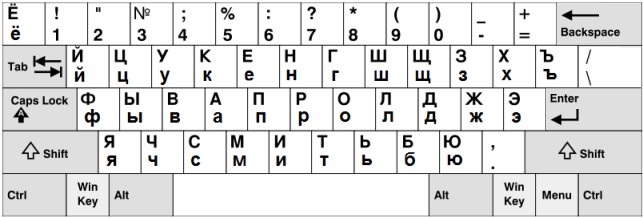
PHONETIC
- a phonetic keyboard (say, ЯВЕРТЫ) which sort-of-matches Russian letters to Latin letters close in pronunciation (also maps extra keys somewhere). These layouts are just fine if you are moderately interested in Russian but that’s it. A phonetic keyboard has an obvious advantage if your physical keyboard does not have Russian letters.
On a Mac it looks like this:
[ADD MISSING IMAGE]
On a PC, it will probably look like this:
[ADD MISSING IMAGE]